


 +971 56 432 2792













Looking to boost your laptop’s performance for gaming or professional work? One of the most common questions tech-savvy users ask is: Can I change the dedicated graphics card in my laptop? At Techmatter UAE, we understand how important performance and flexibility are when it comes to high-end computing. Whether you’re gaming, editing, or developing software, your GPU can make or break the experience.
Let’s break down everything you need to know and why upgrading your graphics solution might not mean opening your laptop at all.
Why Laptop Users Want GPU Upgrades
Laptops are increasingly used for demanding tasks: AAA games, 4K video editing, CAD design, and more. These tasks need serious GPU power. It’s no surprise that users look for ways to improve their system performance, starting with the graphics card. Common reasons include:
- Outdated GPU struggling with new software
- Desire to play modern games at higher settings
- Faster rendering in creative software like Adobe Premiere or Blender
- Better compatibility with AI tools, simulations, or VR platforms
But here’s the catch: for most laptops, the GPU is not like a LEGO piece you can pop in and out.
Can You Actually Replace a Dedicated Laptop GPU?
Let’s be direct in most laptops, no. The dedicated GPU is usually soldered onto the motherboard, making it permanent. You can’t just remove it and slap in a better one like you would with a desktop.
That being said, some ultra-high-end laptops do offer GPU upgrade options. These are rare, bulky, and expensive. Brands like Clevo, Alienware, and a few MSI models use modular designs (like MXM slots), but they’re the exception, not the rule. Even if you find one, the upgrade process involves:
- Disassembling your laptop
- Matching thermal and power profiles
- BIOS compatibility checks
- Potential loss of warranty
The Smarter Move: Go External with eGPU
Here’s where things get interesting. If your laptop supports Thunderbolt 3, Thunderbolt 4, or USB4, you can connect an External Graphics Processing Unit (eGPU). This gives your laptop desktop-grade power without needing to change its internal components.
Pair your laptop with a powerhouse like an NVIDIA Graphics Card via an external GPU enclosure and experience performance upgrades instantly. This method works well for gamers, developers, and content creators who want flexibility and speed.
Benefits of eGPU over Internal Upgrades
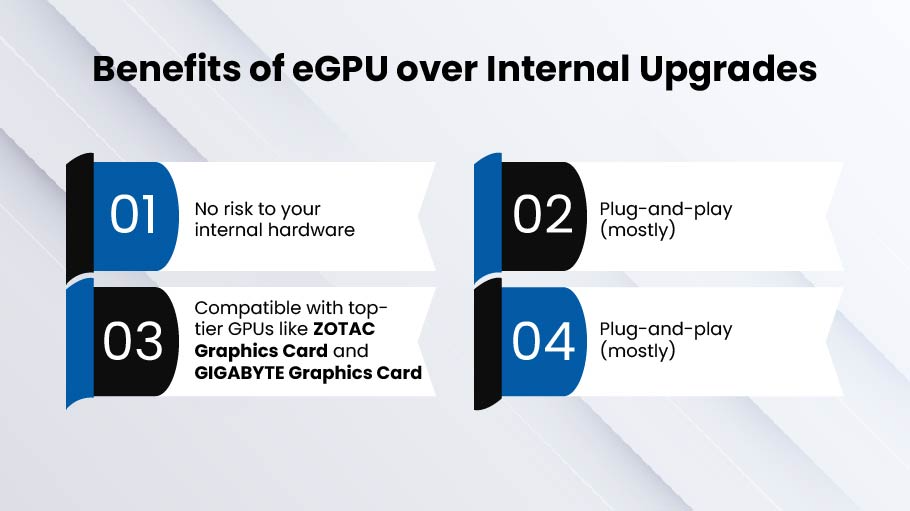
- No risk to your internal hardware
- Plug-and-play (mostly)
- Compatible with top-tier GPUs like ZOTAC Graphics Card and GIGABYTE Graphics Card
- Easily switch between laptops or setups
At Techmatter UAE, we help customers across the UAE set up powerful eGPU solutions tailored to their performance needs and workflows.
When Should You Consider an eGPU?
You’re an ideal candidate for an eGPU if:
- Your laptop has Thunderbolt 3/4 or USB4
- You want to use a GPU like the GIGABYTE Graphics Card without replacing your laptop
- You rely on GPU-intensive tasks such as 3D rendering, gaming, or video production
- You want future-proof flexibility without buying a new device every two years
Plus, with the growing support for external GPUs across Windows and macOS, this solution is more plug-and-play than ever.
Why Desktop Solutions Still Lead the Pack
Even though laptops are catching up, desktop PCs still dominate when it comes to performance per dollar and upgrade flexibility. At Techmatter UAE, we provide a wide selection of desktop graphics cards from entry-level models to top-of-the-line units like the ZOTAC Gaming GeForce RTX series and NVIDIA Quadro GPUs for professionals.
We stock and supply premium-grade models like:
- NVIDIA Graphics Card (RTX, Quadro, GTX series)
- ZOTAC Graphics Card (Gaming and Mini series)
- GIGABYTE Graphics Card (AORUS, Vision, Eagle editions)
Upgrade Smart: When to Replace Your Laptop Instead
Let’s face it, if your laptop can’t support an external GPU and its internal GPU is outdated, the smartest move might be to upgrade your entire system. New gaming and performance laptops now come equipped with:
- Dedicated NVIDIA GPUs (RTX 4060, 4070, or even 4080 in some models)
- High-refresh-rate displays for smooth gaming
- Advanced cooling and modular designs
We at Techmatter UAE help our clients choose desktops and laptops that are ready for the future. No speculating. No needless improvements. Only solutions that truly help you achieve your objectives.
Need Help Choosing the Right Graphics Card in the UAE?
You don’t have to browse forums or gamble with international shipping to upgrade your graphics power. Techmatter UAE is your trusted local source for:
- High-performance NVIDIA Graphics Cards
- Compact and efficient ZOTAC Graphics Cards
- Performance-packed GIGABYTE Graphics Cards
- Full desktop PC builds and laptop upgrade advice
- Reliable warranty and customer support across the UAE
We work with businesses, gamers, developers, and creatives looking for that extra edge. Whether you’re in Dubai, Abu Dhabi, Sharjah, or anywhere else in the UAE, our team can guide you to the right hardware investment.
Final Thoughts: Upgrade with Purpose
Can you replace the dedicated graphics card in your laptop? Rarely, technically. Almost not. However, improving your laptop’s graphics performance doesn’t need opening it up thanks to the development of eGPUs and strong external solutions. If you’re looking for serious GPU power, your best bet is:
- Connecting a top-tier NVIDIA, ZOTAC, or GIGABYTE Graphics Card via an eGPU
- Investing in a new laptop with a high-end GPU already installed
- Building or upgrading a desktop for ultimate flexibility
At Techmatter UAE, we’ll help you find the right path. Let’s build your next powerful setup together.